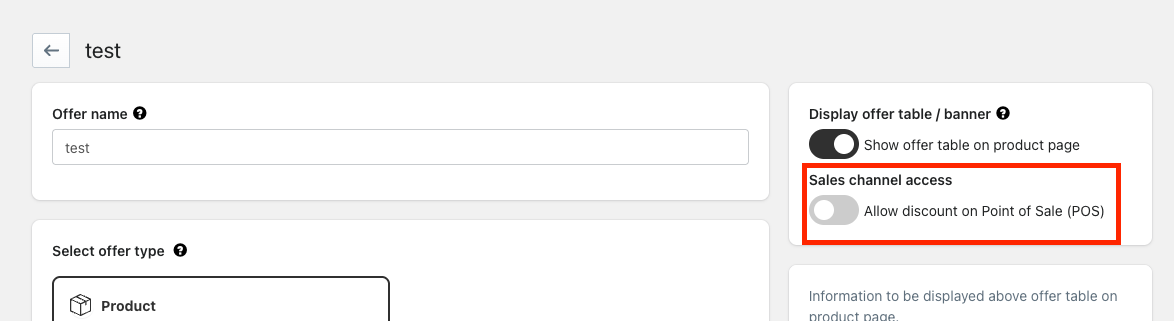
You can choose whether discounts should be applied to orders created through the Point of Sale (POS) channel.
By default, discounts are applied to both online store and POS orders.
Note: POS discount control is supported only when using the Functions version.
What this does
This setting allows you to control whether a discount is available only online or across both online and in-store (POS) purchases.
How it works
- Enabled → Discounts apply on both the Online Store and POS
- Disabled → Discounts apply only on the Online Store (excluded from POS)
How to configure
- Open the discount offer you want to edit
- Locate the “Allow discount on Point of Sale (POS)” toggle on the right-hand side
- Turn the toggle off to exclude the discount from the POS
When to use this
Use this setting when you want to:
- Run online-only promotions
- Prevent discounts from being applied in physical stores
- Avoid stacking or unintended in-store discounts
Example
If you create a 20% discount for your online store and turn off the POS toggle, the discount will not be applied at checkout in POS.
Note
This setting is applied per offer and does not affect other active discounts.
Impact on revenue
This helps protect your in-store margins by preventing unintended discounts at POS and gives you better control over how promotions affect your revenue.
FAQ
Why is my discount not applying in POS?
The “Allow discount on Point of Sale (POS)” setting may be turned off for that specific offer.
Was this article helpful?
That’s Great!
Thank you for your feedback
Sorry! We couldn't be helpful
Thank you for your feedback
Feedback sent
We appreciate your effort and will try to fix the article