Displaying a Wishlist Counter provides powerful social proof by highlighting your bestselling items. Seeing how many other shoppers have favorited a product boosts customer confidence and encourages conversions. By default, this feature is disabled.
Where the Wishlist Counter Appears
Once enabled, the app can display counts in three distinct areas across your storefront:
Product Page Counter: Displays the cumulative number of times a product (including all of its variants) has been saved by all users.
Collection Page Counter: Displays the popularity count directly on the product thumbnail cards within collection grids.
Top Header Counter: Tracks and displays an individual shopper's total personal wishlisted item count directly over the header icon.
Step-by-Step Configuration Guide
To enable and customize your wishlist counters, log into your Shopify admin, open the app dashboard, and navigate to Settings > Display settings > Social-proof Counter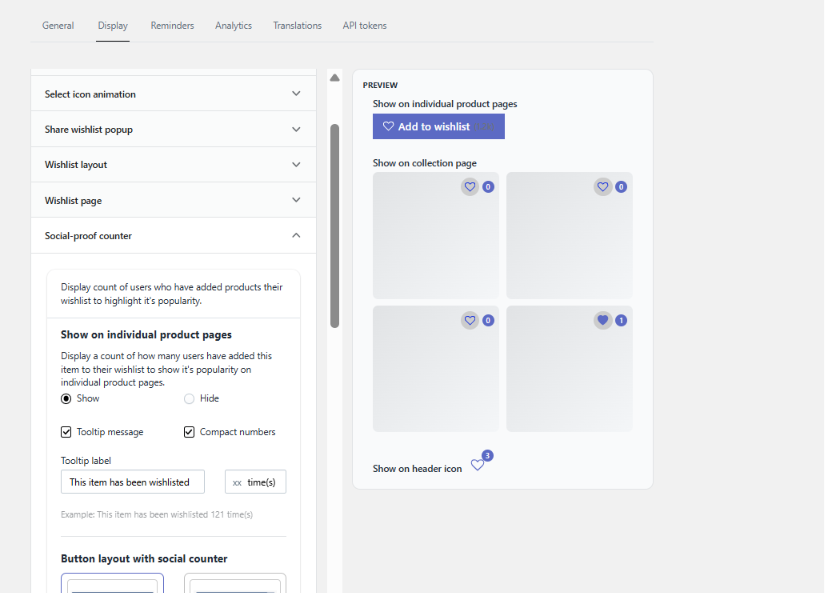
Troubleshooting & Support
️ Important Snippet Note: These counter features rely on active app snippet structures. For Online Store 2.0 themes, ensure your header, product, and collection app blocks are properly positioned via your Shopify Theme Editor.
If enabling the counter distorts your theme elements, shifts other objects on your website, or fails to display after saving, please reach out directly to our support team to get the layout resolved.
Was this article helpful?
That’s Great!
Thank you for your feedback
Sorry! We couldn't be helpful
Thank you for your feedback
Feedback sent
We appreciate your effort and will try to fix the article