We are sorry to hear that you want to uninstall Advanced Wishlist. To make this process as smooth as possible, we have provided an easy way to clean up the app files from your theme before removal.
Because Shopify immediately revokes our database access the moment an app is deleted, we cannot remove any traces of the app's code after uninstallation. Following the guide below ensures your theme files remain clean.
Uninstallation Guide for Online Store 2.0 Users
Please complete these steps before deleting the app from your Shopify Admin:
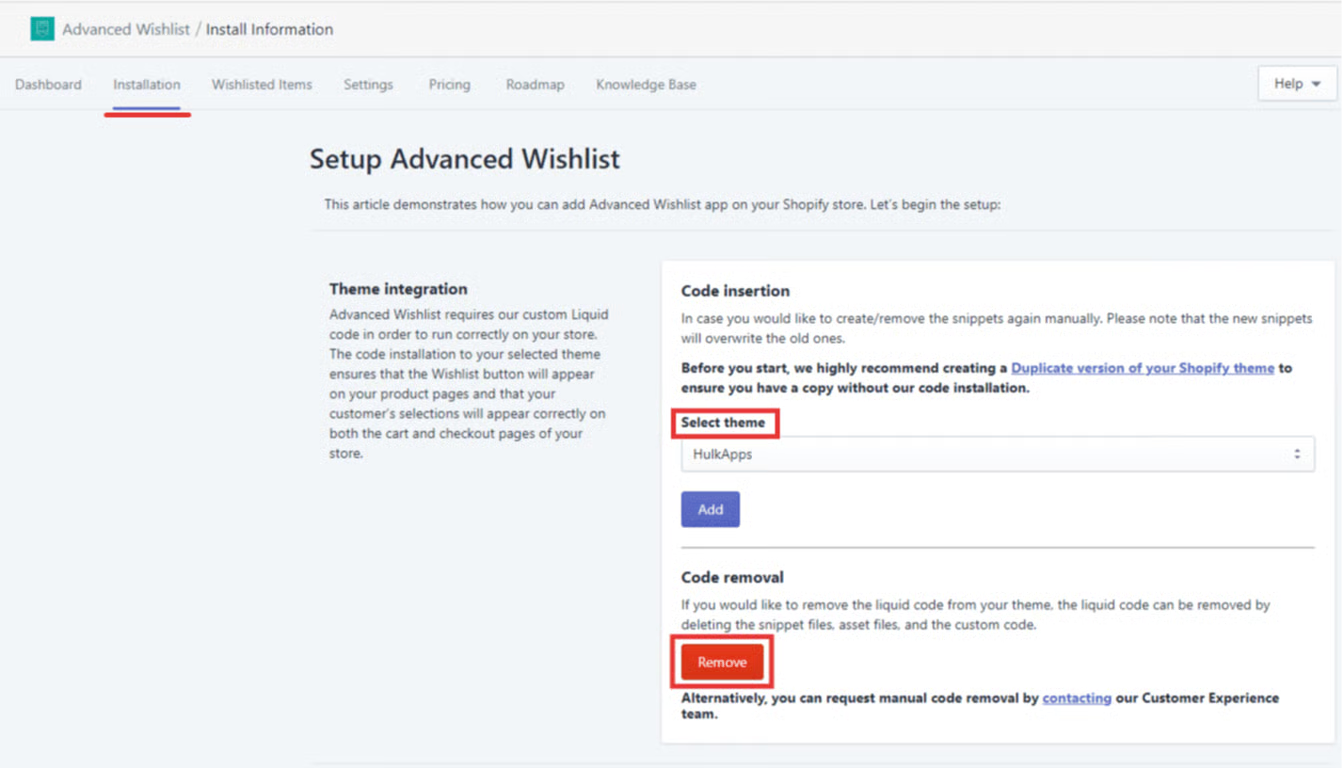
Navigate to your app's backend settings.
Go to the Installation tab.
Select your active theme from the options provided.
Click the Remove button.
Confirming Successful Removal
Once the file removal process is complete, a confirmation message stating “Files are successfully removed” will pop up at the bottom of your screen. After seeing this message, you can safely delete the app from your Shopify Apps list.

Need Extra Assistance?
If you want to verify that the app code has been completely removed from your theme, or if you need manual help with the clean-up, please email us directly at help@hulk-support.com.
Was this article helpful?
That’s Great!
Thank you for your feedback
Sorry! We couldn't be helpful
Thank you for your feedback
Feedback sent
We appreciate your effort and will try to fix the article