Add customer tags to allow specific customers only to view the offer, hide offers for specific customers, limit quantity discount, schedule offer, round-off discounted price, and country selection to enable the offer in specific countries only.
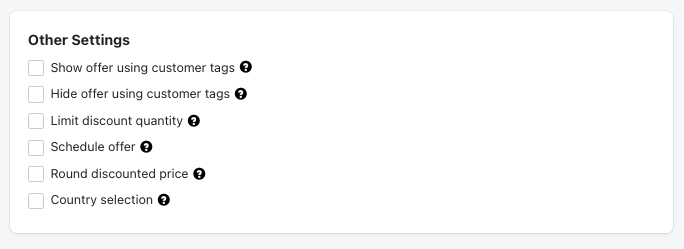
Show offer using customer tags: Add customer tag here to allow only these tagged customers to get the benefits of the offer.

Hide offers using customer tags: If you want to hide offers from certain customers you can add those customers tags here.

Limit discount quantity: Offer can be valid for the first added quantities only in this box, after that the offer will not be applied or auto-deactivated. Eg. Once a customer buys 10 quantities of products under this offer, then the offer will be automatically deactivated.

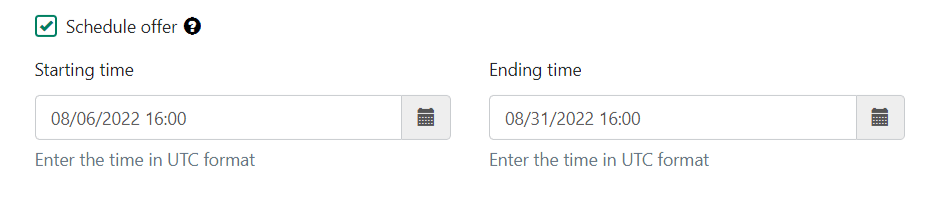
Schedule offer: You can add the start date and end date to schedule an offer in future.
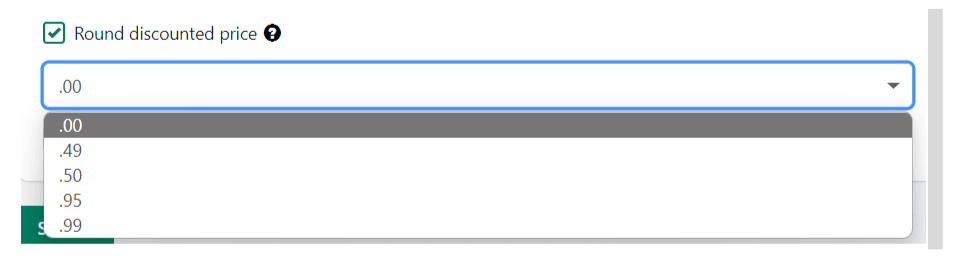
Round discounted price: Selected the round decimal digits to apply on the discounted price.
Country selection: Use this option if you wish to activate the offer only to specific countries, if this field is left blank - offer will be active worldwide/globally.

Was this article helpful?
That’s Great!
Thank you for your feedback
Sorry! We couldn't be helpful
Thank you for your feedback
Feedback sent
We appreciate your effort and will try to fix the article