Enabling the App Embed in your Shopify Theme Customizer is a required one-time setup step. This permits Hulk Form Builder scripts to load correctly on your storefront so your forms can render for visitors.
Step-by-Step Guide
From your Shopify Admin, navigate to Online Store → Themes.
Click the Customize button next to your active live theme.
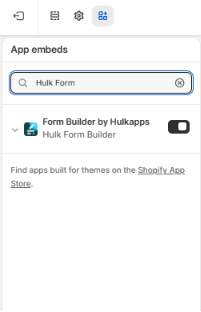
On the far-left sidebar, click the App embeds tab (represented by the layer/cube icon).
Locate Hulk Form Builder in the list of available app embeds.
Toggle the switch to Enabled (ON).
Click Save in the upper-right corner of the Theme Editor to publish your changes.
⚠️ Troubleshooting & Important Notes
Why is my form not displaying?
If your form is published inside the app but does not appear on your storefront, the App Embed is almost always turned off. Ensure the toggle in your Theme Customizer is switched on and saved.
Your form will now appear in your store if it has been embedded. Learn how to embed your form.
Was this article helpful?
That’s Great!
Thank you for your feedback
Sorry! We couldn't be helpful
Thank you for your feedback
Feedback sent
We appreciate your effort and will try to fix the article
