How to enable the “Edit in Cart” feature for customers to modify selected options on the Cart page?
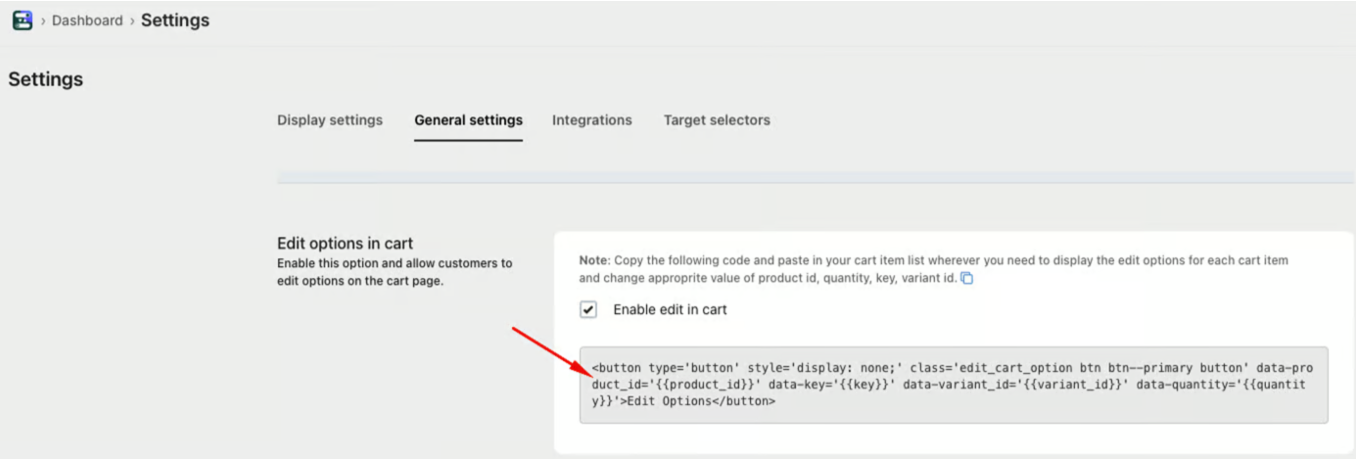
- In the app dashboard, go to Settings → General Settings, then enable the option “Enable Edit Options in Cart” and click Save.
If the Edit Option button doesn’t appear on the cart drawer or cart page, add the provided code snippet to the appropriate theme file as shown.
Was this article helpful?
That’s Great!
Thank you for your feedback
Sorry! We couldn't be helpful
Thank you for your feedback
Feedback sent
We appreciate your effort and will try to fix the article