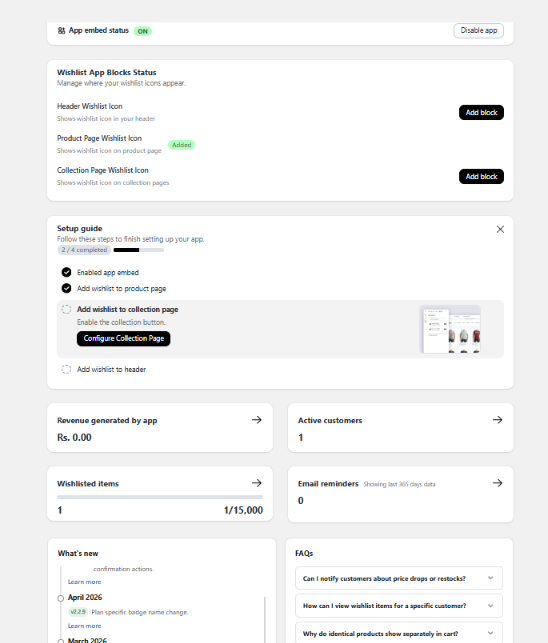
The Hulk Advanced Wishlist dashboard provides a quick, central overview of your wishlist status, app setup, and key performance insights. It is designed to help you monitor app activity, verify storefront visibility, track customer engagement, and view the latest app announcements.
App Embed Status
This section tracks whether the app is active within your Shopify theme layer:
ON: The app embed is turned on and running on your storefront.
Disable app: Disables frontend wishlist functionality without uninstalling the app.
Note: The App Embed switch must be toggled ON in your Shopify Theme Customizer for the wishlist buttons and counters to work correctly.
Wishlist App Blocks Status
This section shows where your wishlist interactive objects are currently active and allows you to quickly adjust their storefront placements:
Header Wishlist Icon: Displays a global wishlist access icon in your store's main header navigation menu. Gives customers a central place to view and manage their boards.
Product Page Wishlist Icon: Adds the main "Add to Wishlist" action button directly on product description pages so customers can save items while browsing.
Collection Page Wishlist Icon: Places a smaller save icon overlay directly onto product thumbnail cards within collection grid views. This allows customers to save items without opening the individual product page.
Setup Guide
The Setup Guide provides a visual progress indicator that helps you finish your core app configurations. It tracks and guides you through:
Enabling the global app embed.
Placing the wishlist button on product pages.
Placing the wishlist icon on collection grids.
Adding the wishlist shortcut to the top header.
Analytics Overview
Track customer engagement volume and Direct Revenue Performance metrics through these live dashboard indicators:
Revenue Generated by App: Displays the exact sales revenue generated from checkout transactions where a customer purchased items directly via wishlist paths.
Active Customers: The total number of unique customers who have interacted with your wishlist features.
Wishlisted Items: Shows the cumulative count of products currently saved across all shopper lists, highlighting overall product interest trends.
Email Reminders: Displays the total volume of automated notification emails (General, Restock, Low Stock, or Price Drop) sent out to recover carts.
Newly Added Dashboard Sections
To keep you up to date and provide instant answers, we have integrated two new spaces directly into the dashboard:
What's New: A direct feed where you can view all recent changelogs, features, improvements, and application update releases.
FAQs: Access quick answers to frequently asked technical and account questions right from the core dashboard workspace.
Was this article helpful?
That’s Great!
Thank you for your feedback
Sorry! We couldn't be helpful
Thank you for your feedback
Feedback sent
We appreciate your effort and will try to fix the article