When a customer is ready to buy, the app provides a quick and seamless way to move their favorite wishlisted items directly into the shopping cart. This eliminates the need for shoppers to navigate back to individual product pages, improving the checkout experience and increasing conversions.
Moving Items to the Cart
Single Item Move: Shoppers can click the Move to Cart button next to any individual product on their wishlist page to instantly transfer that specific item to the active shopping cart.
Bulk Move to Cart: To speed up the purchasing process, the app features a 1-click button that allows customers to move multiple or all wishlisted items into the cart simultaneously.
Configuring Post-Add Checkout Behavior
Store owners can control exactly how the storefront behaves after a customer moves a wishlist item to their cart. These settings can be configured inside the app admin dashboard:
1. Page Redirection Preference
You can decide whether the shopper stays on their current page or is immediately guided forward:
Remain on the Wishlist Page: Keeps the user on their wishlist board so they can continue reviewing other saved products.
Redirect to the Cart Page: Automatically routes the customer to the shopping cart or checkout page to encourage immediate purchase completion.
2. Wishlist Retention Preference
You can determine whether items should disappear from the wishlist once moved to the cart:
Remove from Wishlist: Automatically cleans up the customer's wishlist board by deleting the item the moment it is transferred to the cart.
Keep in Wishlist: Retains the product on the customer's wishlist board even after it has been added to the shopping cart, which is ideal for items shoppers like to buy repeatedly.
To configure these preferences, open your Shopify admin, open the app dashboard, and navigate to Settings > General settings > Wishlist Page > Cart Actions. From there, you can adjust the following options: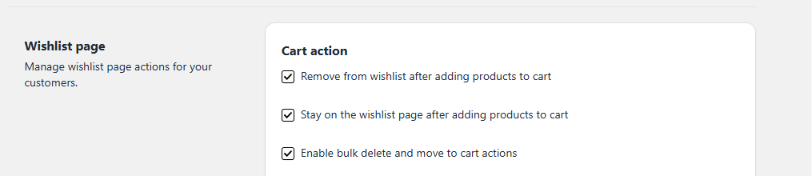
Was this article helpful?
That’s Great!
Thank you for your feedback
Sorry! We couldn't be helpful
Thank you for your feedback
Feedback sent
We appreciate your effort and will try to fix the article