Inventory Threshold
“Inventory Threshold” lets you set a lower limit (threshold) on your inventory for options created via Hulk Product Options.
Once inventory for an option or variant falls below this threshold, certain behaviors can be triggered. For example, it might prevent that option from being displayed, disable ordering that option, or show a “low stock” message.
How it works / Setup
First, the option must be one created via the Hulk app, and the inventory management feature enabled for it.
In the app settings (or the option/variant setting), you configure what the threshold is (i.e. how many units left before triggering the threshold condition).
Decide what should happen when threshold is reached — for example:
The option might be hidden or greyed out.
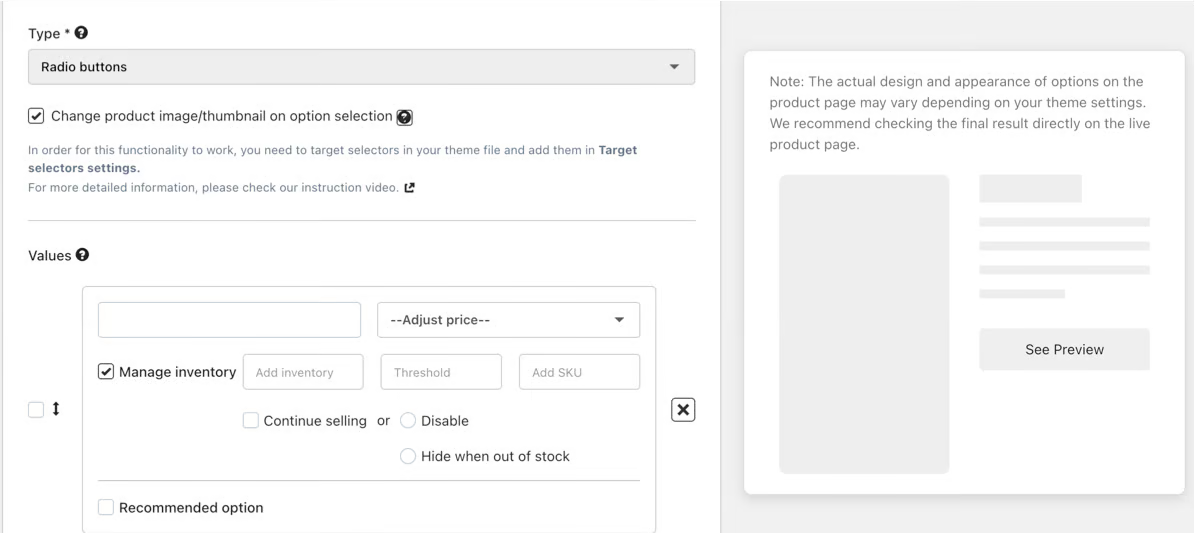
The option could become non-selectable so customers can’t choose it if the inventory is too low.
Was this article helpful?
That’s Great!
Thank you for your feedback
Sorry! We couldn't be helpful
Thank you for your feedback
Feedback sent
We appreciate your effort and will try to fix the article