The Address element allows users to enter their complete address, including street, city, state, and postal code. It is useful for shipping information, billing details, or location-specific data.
Available Options:
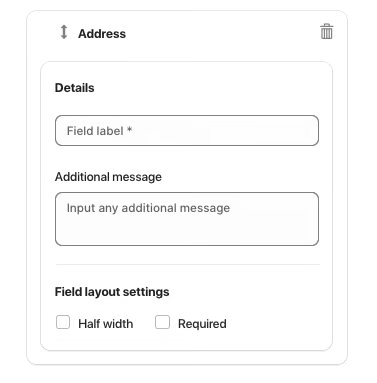
Field label – sets the visible name of the address field.
Additional message – optional helper text displayed below the field.
Field Layout Settings:
Half width – displays the field in half of the form width.
Required – makes the address field mandatory.
Note:
How to Customize Address Field Labels
You can rename any standard address field label (such as changing "Zip" to "Post code" or "Province" to "County") directly from your form settings.
Open Hulk Form Builder in your Shopify admin.
Select your form and click Edit.
Go to Settings → Custom messages.
Scroll down to the Specialize messages section.
Locate the field labels you want to update (e.g., Zip, Province, or State).
Enter your preferred text into each field (e.g., enter Post code or County).
Click Save.
Your form will immediately display your updated labels on the storefront.
Was this article helpful?
That’s Great!
Thank you for your feedback
Sorry! We couldn't be helpful
Thank you for your feedback
Feedback sent
We appreciate your effort and will try to fix the article