The Shopify integration allows you to connect your form directly with your Shopify store and automate user-related actions.
Available options
Create Shopify customer – creates a new customer in your Shopify store.
Send account activation email – automatically sends an account activation email to the customer.
Add tags for existing customers – adds tags to existing customers in Shopify.
Steps to Reproduce / How to set up Shopify integration
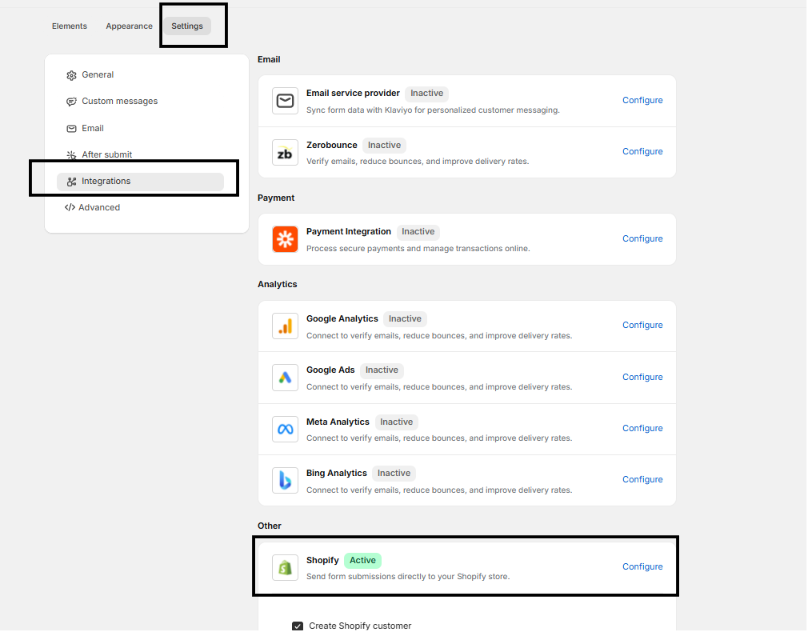
Open the desired form → go to Settings -> Integration → Shopify Integration.
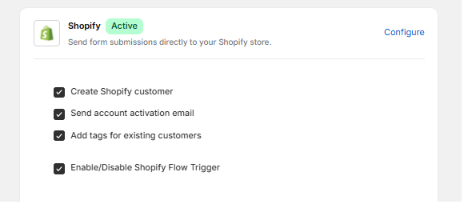
Check the desired options:
✅ Create Shopify customer
✅ Send account activation email
✅ Add tags for existing customers
Click Save to store the settings.
Once a user submits the form, the selected options will be triggered directly in your Shopify store.
Field Mapping Reference & Constraints
To pass custom data to Shopify, enter the exact value into the Shopify Field setting under the element options for each form item.Email Address
Element Type: Email Input
Shopify Field: (Automatic)
Rules: Saved automatically. No parameter required.
First Name
Element Type: Single Line Text
Shopify Field:
first_nameRules: Maps directly to the Shopify customer profile.
Last Name
Element Type: Single Line Text
Shopify Field:
last_nameRules: Maps directly to the Shopify customer profile.
Phone Number
Element Type: Phone Input
Shopify Field:
phoneRules: Must use a valid format and be unique (not tied to another Shopify customer).
Customer Note
Element Type: Textbox / Text Area
Shopify Field:
noteRules: Appends notes directly to the customer profile in Shopify.
Customer Tags
Element Type: Hidden
Shopify Field:
tagsRules: Applies custom tags to the customer account upon submission.
Address
Element Type: Address Field
Shopify Field: (Automatic)
Rules: Requires standard English labels. State and Country must form a valid matching pair.
Email Subscription
Element Type: Checkbox
Shopify Field:
email_marketing_consentRules: Subscribes the customer to email marketing.
SMS Subscription
Element Type: Checkbox
Shopify Field:
sms_marketing_consentRules: Requires a mapped Phone element in the same form to function.
Critical Validation Rules
Important Shopify Requirements for Account Creation:
Address Data: Shopify strictly validates Country and State inputs. If the Country and State do not match, or if field labels are not in standard English, the address will fail to save and the customer account will not be created.
Phone Uniqueness: The phone number must not already exist on another customer profile in your Shopify store, or account creation will fail.
- SMS Marketing Consent: Using the SMS consent checkbox (
sms_marketing_consent) requires a mapped Phone element and a Password element set to Required. If your form does not require a customer password, you must remove thesms_marketing_consentfield, or account creation will fail.
Was this article helpful?
That’s Great!
Thank you for your feedback
Sorry! We couldn't be helpful
Thank you for your feedback
Feedback sent
We appreciate your effort and will try to fix the article
