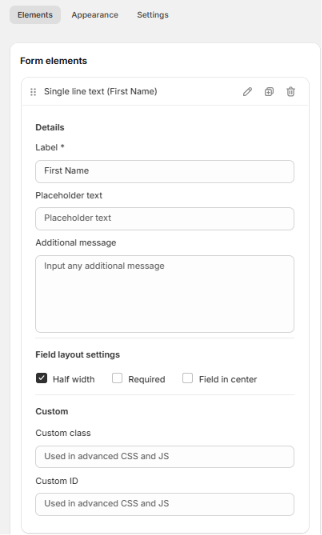
The Single Line Text element allows users to enter short text responses such as names, titles, or other brief information.
Available Options:
Field label – defines the name of the field shown to users.
Placeholder text – shows a sample text inside the input before the user types.
Additional message – optional note or instruction displayed below the field.
Field Layout Settings:
Half width – positions the field to take half of the form width.
Required – makes the field mandatory.
Field in center – centers the field on the form.
Advanced Settings:
Custom class – used for styling or scripts (advanced CSS/JS).
Custom ID – allows you to target this field directly via CSS or JavaScript.
Was this article helpful?
That’s Great!
Thank you for your feedback
Sorry! We couldn't be helpful
Thank you for your feedback
Feedback sent
We appreciate your effort and will try to fix the article