Overview
For Function Version Volume Offers, merchants can import Smart Rules directly using the "Sample with Conditions" template.
Please note this way of importing is advised only for merchants with advanced JSON knowledge. Otherwise, the suggested way is to import offers regularly without conditions, and then manually add conditions in app.
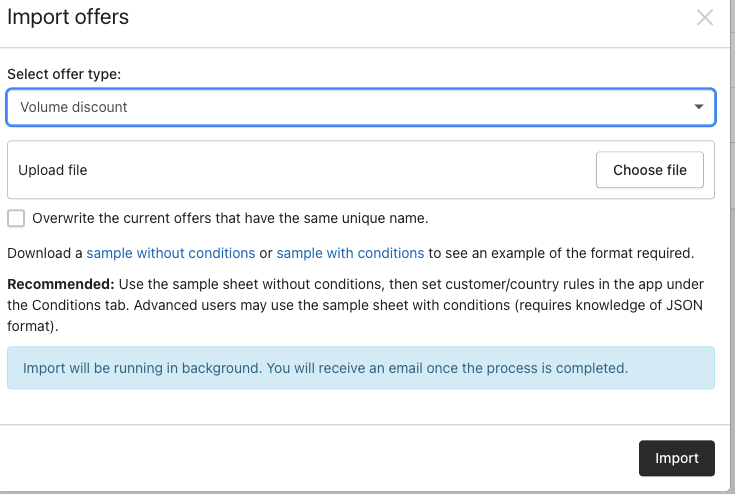
There are two import templates available:
Note: Export always includes Smart Rules columns.
Smart Rule Columns
The template contains three Smart Rule columns.
If all three columns are blank, the offer is imported without Smart Rules.
Apply Match
Determines how multiple condition groups are evaluated.
Supported Apply Conditions
Supported Suppression Conditions
Suppression prevents a discount from being applied even if Apply conditions pass.
Supported fields:
Customer Tag Behavior
JSON Format
Apply Match
all
or
any
Condition Sets
Must be a JSON Array.
Example:
[
{
"match":"all",
"conditions":[
{
"field":"customer_tag",
"operator":"is",
"value":"vip"
}
]
}
]
Suppression
Must be a JSON Object.
Example:
{
"match":"any",
"conditions":[
{
"field":"customer_tag",
"operator":"is",
"value":"employee"
}
]
}
Valid ISO code
AC AE AF AG AI AL AM AN AO AQ AR AS AT AU AW AZ BA BB
BD BE BF BH BI BJ BM BN BO BR BS BT BW BY BZ CA CF CG
CH CI CK CL CM CN CO CR CS CT CU CV CX CY CZ DE DK DM
DO DZ EC EE EG EH EK EQ ER ES ET EV FI FJ FK FM FO FR
GA GB GD GE GF GG GH GI GL GM GN GO GP GR GS GT GU GW
GY HK HN HQ HR HT HU ID IE IL IM IN IO IQ IR IS IT JE
JM JN JO JP JQ JU KE KG KH KI KN KS KW KY KZ LA LB LC
LI LK LR LS LT LU LV LY MA MC MD MG MH MK ML MM MN MO
MP MQ MR MS MT MU MV MW MX MY MZ NA NC NE NF NG NI NL
NO NP NR NZ OM PA PE PF PH PK PL PM PN PR PS PT PW PY
QA RE RO RS RU RW SA SB SC SD SE SG SH SI SJ SK SL SM
SO SR ST SY SZ TD TF TG TH TJ TK TM TN TO TR TT TV TW
TZ UA UG UN US UY UZ VA VC VE VG VN VU WF WL WS XX YE
YT ZA ZM ZW
Import Tips
Use the Sample with Conditions template when importing Smart Rules.
Keep JSON in a single Excel cell.
Do not modify or reorder column headers.
Exported files can be imported back without changes.
Blank Smart Rule columns create offers without conditions.
Common Import Errors
Was this article helpful?
That’s Great!
Thank you for your feedback
Sorry! We couldn't be helpful
Thank you for your feedback
Feedback sent
We appreciate your effort and will try to fix the article