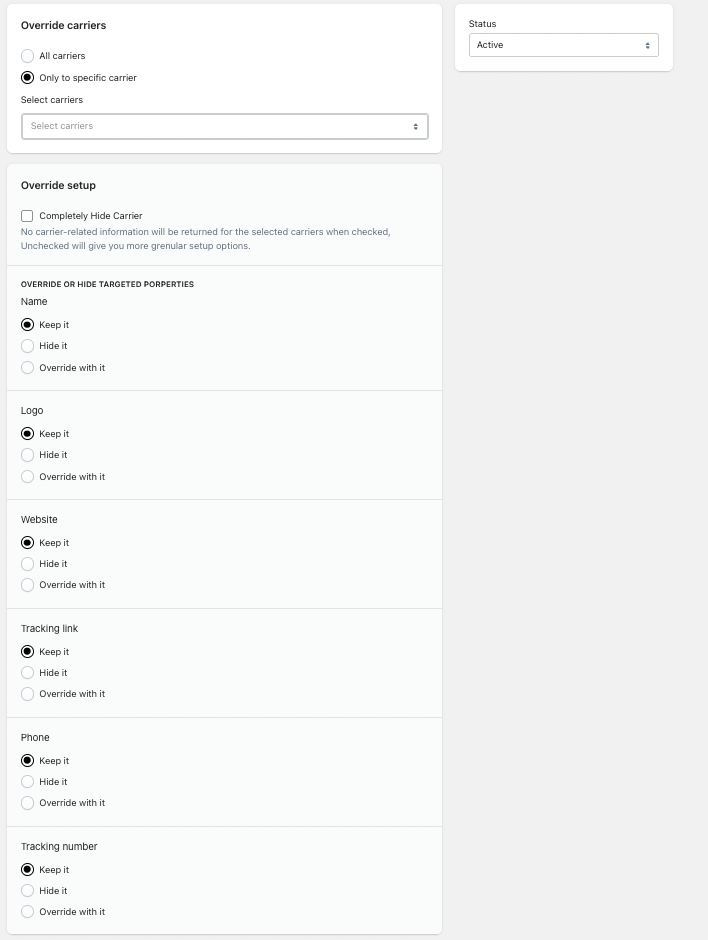
The Carrier Masking Rules feature allows you to override, modify, or completely hide carrier information displayed to your customers on the tracking page.
This is useful if you want to:
Hide dropshipping or third-party logistics partners
Display a custom carrier name instead of the original one
Remove carrier branding from the tracking experience
Maintain a fully branded post-purchase journey
How It Works
Carrier Masking lets you control how carrier details appear on your tracking page.
You can:
Apply the rule to all carriers
Apply the rule to specific carriers only
Hide the carrier completely
Override the carrier’s name, logo, or website
How to Create a Carrier Masking Rule
Go to Shipments → Carrier Masking
Click Add Rule
Configure the settings as needed
Click Save
Configuration Options Explained
1. Override Carriers
Choose how broadly the rule should apply:
All carriers – The rule applies to every shipment.
Only to specific carriers – Select one or more carriers to target.
Use this if you only want to mask specific logistics providers.
2. Status
Set whether the rule is:
Active – Rule is applied immediately.
Inactive – Rule is saved but not applied.
3. Completely Hide Carrier
When enabled:
The carrier name will not be shown to customers.
The carrier website will not be displayed.
Carrier branding will be removed from the tracking page.
This is ideal for white-label shipping setups.
If unchecked, you can configure individual elements instead.
Override or Hide Targeted Properties
You can control specific carrier properties individually:
Carrier Name
Options:
Keep it – Show original carrier name.
Hide it – Do not display the name.
Override with it – Replace with a custom name.
Example:
Replace “China Post” with “Standard Shipping”.
Carrier Logo
Options:
Keep it
Hide it
Override with it (upload your own logo)
Useful for maintaining consistent branding.
Carrier Website
Options:
Keep it
Hide it
Override with it (provide a custom URL)
You can redirect customers to:
Your own tracking page
A branded support page
A custom shipping information page
Common Use Cases
White-Label Dropshipping
Hide original carrier details and display your brand instead.
Multi-Carrier Branding
Standardize all carriers under a single brand identity.
Customer Experience Control
Prevent customers from leaving your store to track shipments externally.
Important Notes
Rules apply to shipments processed after the rule is activated.
If multiple masking rules apply, system priority logic will determine which one is used.
Hiding carrier information may affect customer transparency — use carefully.
Best Practices
Keep branding consistent across tracking pages.
Avoid misleading carrier information.
Test changes before applying to all carriers.
Clearly communicate shipping timelines in your store policies.
Was this article helpful?
That’s Great!
Thank you for your feedback
Sorry! We couldn't be helpful
Thank you for your feedback
Feedback sent
We appreciate your effort and will try to fix the article