Summary:
If your customers' selected options appear on the order but the extra charge for those options isn't included in the total, the order was most likely placed in a way that skipped the app's add-on pricing (draft order process). The most common causes are express checkout or Buy Now buttons, cart behavior, and other apps or leftover code that change the cart or checkout. Follow the steps below to find the cause on your store.|
1. Where should I start?
Open the affected order in your Shopify admin and check:
- That the option details appear under the product
- That the order total doesn't include the add-on price
- When the order was placed, and whether you made any theme or app changes around that time
Then add the same product with the same options on your store and check whether the add-on price shows in the cart and at checkout.
2. The order was placed with the Buy Now (Dynamic Checkout) button. What should I check?
Orders placed with Buy Now skip the standard Add to Cart → Checkout flow, so the app needs a setting turned on to include the add-on charge.
How to fix:
- Go to Hulk Product Options → General Settings.
- Turn on Enable Shopify and Shop Pay Express Checkout Buttons.
- Place a test order using Buy Now and check that the add-on price is included.
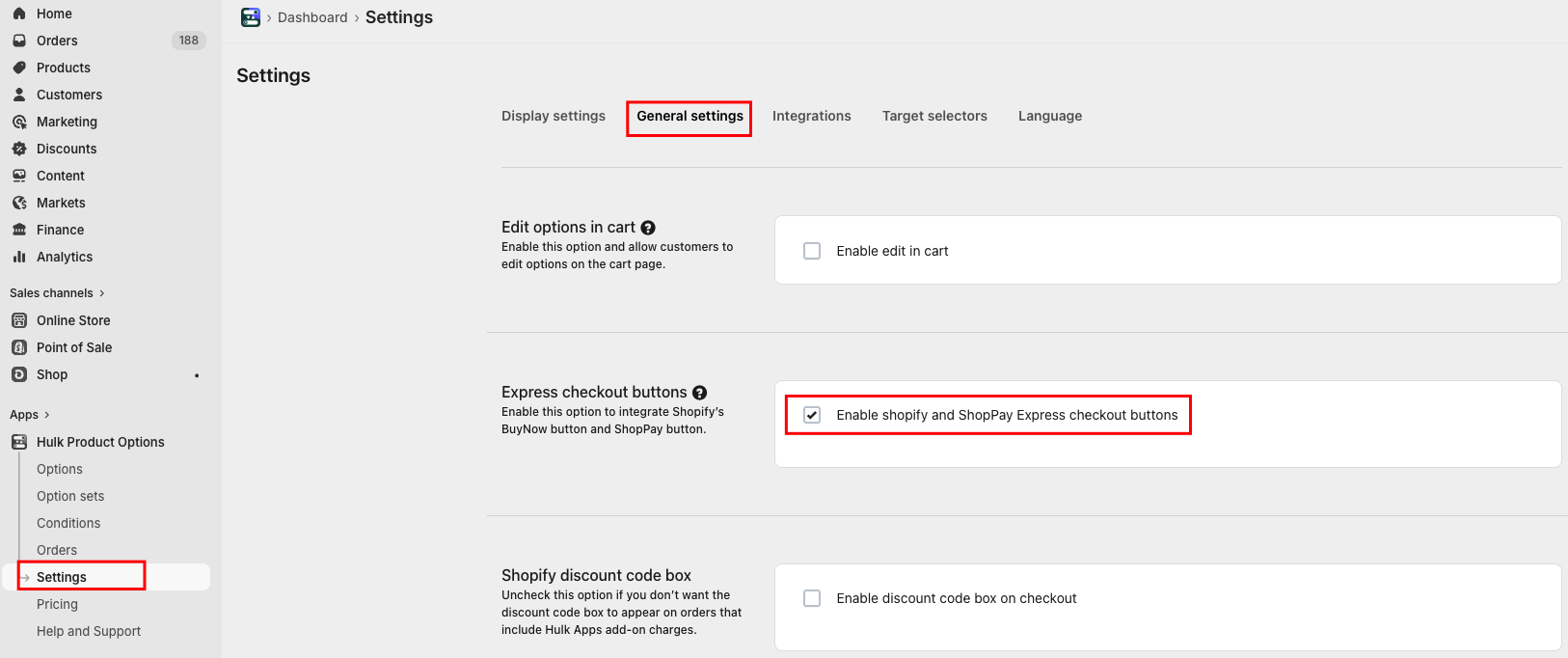
Note: The app supports Shop Pay and Buy Now buttons on the product page only.
3. Can other payment buttons skip the add-on charge?
Yes. Additional payment buttons (such as Google Pay, PayPal, Apple Pay or other accelerated checkout buttons) can bypass the app's draft order process, so the add-on charge isn't carried over to the order.
How to check:
- Look for extra payment buttons on your product page, cart page and cart drawer.
- Add a product with options and complete a test checkout using one of these buttons.
- Check whether the add-on price is included.
How to fix: Turn off these additional payment buttons on the product page, cart page and cart drawer in your theme settings. Customers can still use these payment methods at the checkout page, where the add-on charges are included correctly.
4. Can the cart drawer or cart page cause this?
How to check:
- Add a product with options to the cart and go to checkout from the cart drawer.
- Do the same from the cart page.
- Change the quantity up and down and check that the add-on price updates.
- Remove the item or an option and check that the total changes correctly.
If the add-on price is missing or wrong at any step, note where it happened.
5. Can customers add the product before the options fully load?
Yes. If a customer clicks Add to Cart before the options finish loading, the add-on price may not be applied.
How to check:
- Reload the product page (try on mobile too).
- Select options and click Add to Cart as quickly as possible.
- Check whether the add-on price shows in the cart.
6. Can Quick View or quick Add to Cart buttons cause this?
Yes. Many themes have a Quick View pop-up or a quick Add to Cart button/icon on the home page, collection pages or search results. These can add the product without going through the app's pricing.
How to check: Add the product from each of these places and check whether the add-on price shows in the cart.
How to fix: Turn off Quick View or the quick Add to Cart button for products that have options
.
7. The order was placed through the normal Add to Cart → Checkout flow. What else can cause this?
Third-party apps that change the cart, checkout or product page can interfere with or overwrite the app's draft order logic, which stops the add-on charge from being added.
Common types of apps that can cause this:
- Upsell / cross-sell apps that add product recommendations or bundle offers in the cart
- Discount or cart modification apps that apply automatic discounts or change cart behavior
- Wholesale or B2B pricing apps that change product prices or checkout rules
How to check:
- Review the apps installed on your store for any of the types above.
- Temporarily disable a suspected app and place a test order again.
8. I already uninstalled a conflicting app. Can it still cause the issue?
Yes. Some apps leave code behind in your theme files after they're uninstalled, and this leftover code can still override the app's draft order logic.
How to fix:
- Review your theme files for code left by previously used cart, checkout, upsell or discount apps, and remove it.
- Place a test order again to confirm the add-on charges are included.
Tip: Duplicate your theme before editing theme code, so you can restore it if needed.
9. I've checked everything and the issue is still happening. What should I do?
Feel free to write to us here: [Submit a ticket]
Or visit our live chat support from the app to report the issue. Please share:
- The affected order ID(s)
- Any apps you think may be conflicting
- Screenshots or a screen recording, if possible
Was this article helpful?
That’s Great!
Thank you for your feedback
Sorry! We couldn't be helpful
Thank you for your feedback
Feedback sent
We appreciate your effort and will try to fix the article