Shipment Performance
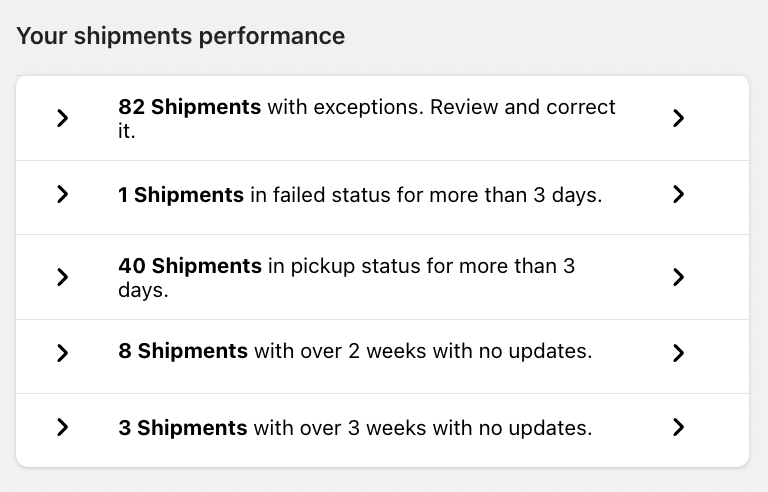
The Your Shipments Performance section highlights potential delivery issues that may require your attention.
It automatically flags shipments that:
Have exceptions
Are in failed status for more than 3 days
Are in pickup status for more than 3 days
Have no updates for over 2 weeks
Have no updates for over 3 weeks
This proactive monitoring helps you:
Resolve delivery delays quickly
Improve customer satisfaction
Reduce support tickets related to shipping
Clicking on any item will take you to the relevant shipment list for further action.
Summary Section
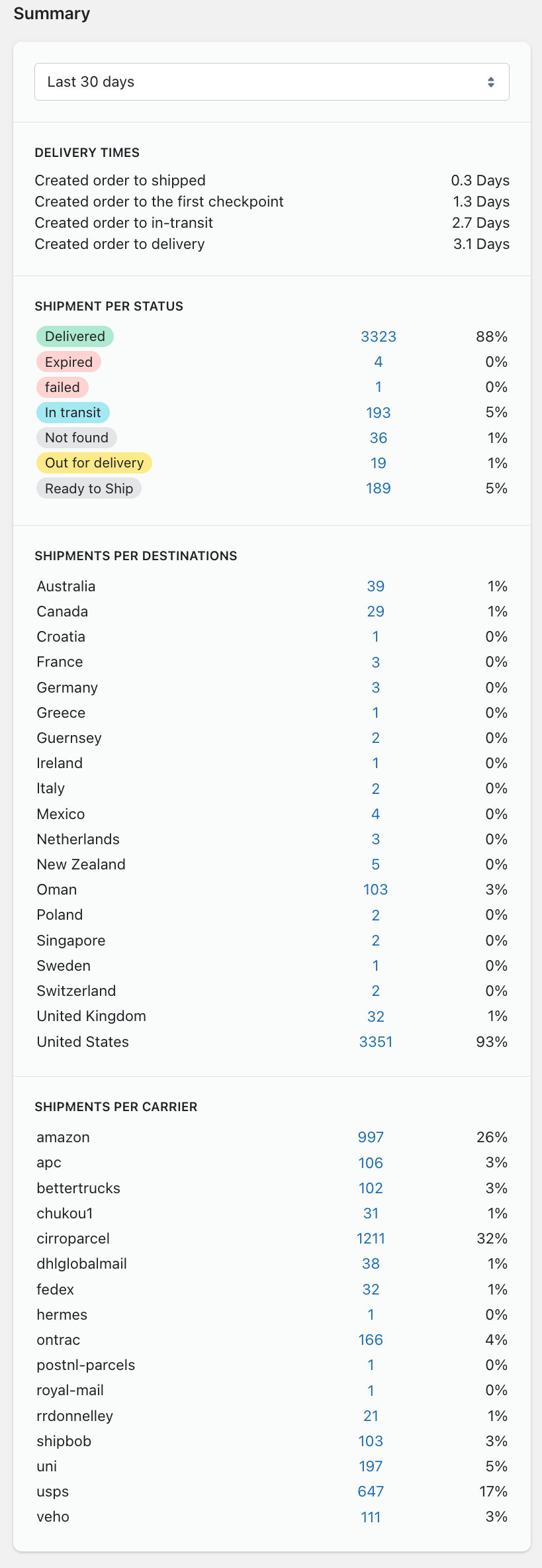
The Summary panel provides a deeper breakdown of shipment performance. You can filter the data by date range (e.g., Last 30 Days).
Delivery Times
This section displays average delivery timeline metrics, including:
Created order to shipped
Created order to first checkpoint
Created order to in-transit
Created order to delivery
These insights help you:
Evaluate carrier efficiency
Optimize fulfillment timelines
Set accurate delivery expectations for customers
Shipments Per Status
This shows the distribution of shipments by status:
Delivered
Pre Transit
Pending
In Transit
Out for Delivery
Exception
Pickup
Failure
Failed Attempt
You can quickly understand:
What percentage of orders are successfully delivered
How many shipments are delayed or facing issues
Where customers are in their delivery journey
Shipments Per Destination
This section breaks down shipments by destination country.
Use it to:
Identify top shipping regions
Monitor international performance
Detect region-specific delays
Shipments Per Carrier
This section shows shipment distribution by carrier (e.g., USPS, FedEx, UPS, DHL).
This helps you:
Compare carrier performance
Identify which carriers handle the most volume
Make data-driven shipping decisions
Why the Analytics Dashboard Matters
The Analytics Dashboard helps you:
Improve post-purchase experience
Reduce WISMO (“Where Is My Order?”) inquiries
Identify delivery bottlenecks
Make smarter logistics decisions
Increase customer trust and retention
Important Notes
Data starts tracking after the app is installed and tracking is enabled.
Shipment insights depend on valid tracking numbers and supported carriers.
Real-time data may experience slight delays depending on carrier updates.
Was this article helpful?
That’s Great!
Thank you for your feedback
Sorry! We couldn't be helpful
Thank you for your feedback
Feedback sent
We appreciate your effort and will try to fix the article