The Payment Settings tab allows you to personalize net payment options and control how they appear for specific customers.
This feature works only with the “Cash on Delivery” (COD) payment method in your store.
What Does This Feature Do?
Payment Settings lets you:
Create custom net payment options
Assign those options to specific customer tags
Control which payment option appears for which customer group
In simple terms:
You can offer different payment terms to different customers — but only when they select Cash on Delivery at checkout.
How It Works
You can:
Create a payment option
(Example: Net 7 days, Net 15 days, Net 30 days)Assign a customer tag
(Example: “VIP”, “Wholesale”, “B2B”)Link the payment option to that tag
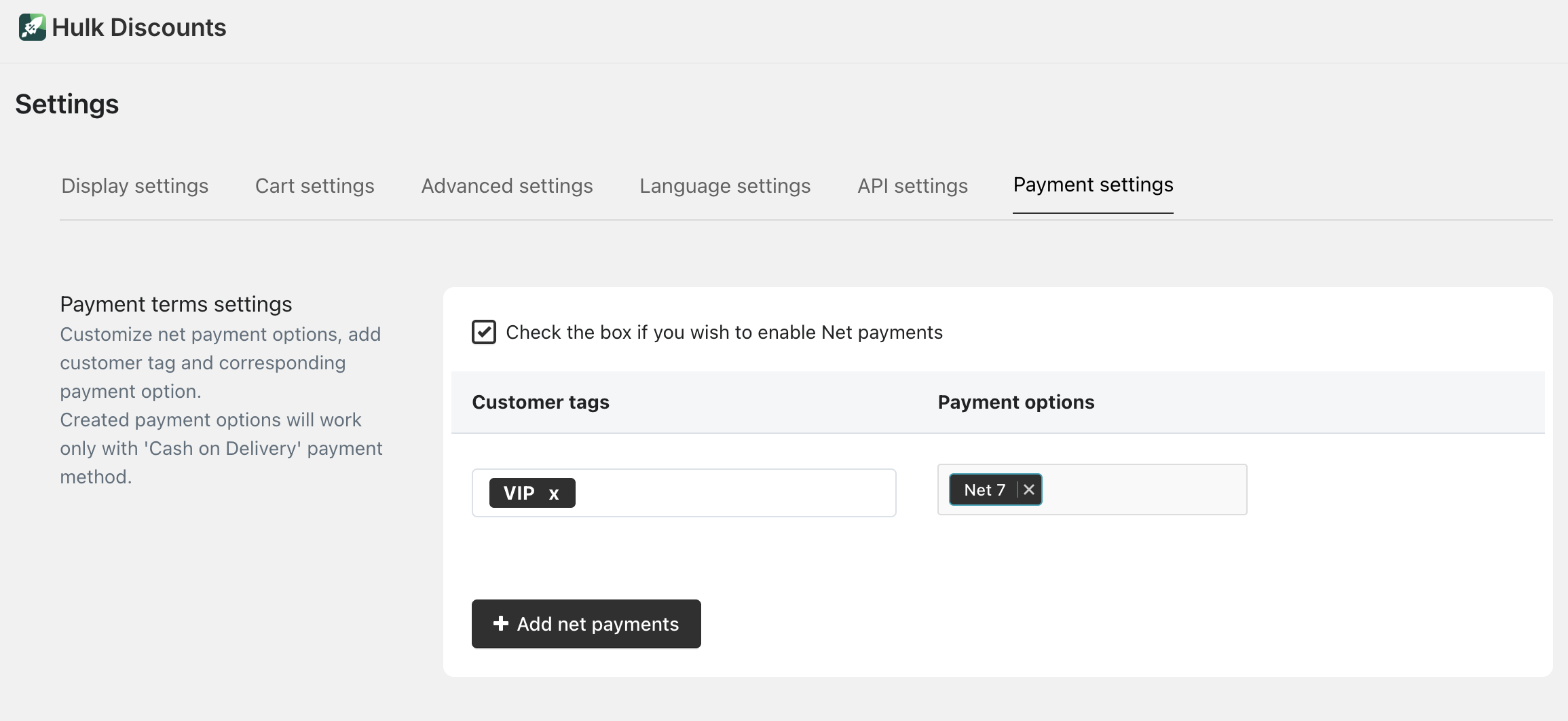 When a customer with that specific tag places an order using Cash on Delivery, the assigned net payment option will apply.
Important Note
Created payment options work exclusively with Cash on Delivery.
They will not apply to credit cards, PayPal, ShopPay, or other payment methods.
When Should You Use This?
This feature is useful if you:
Work with wholesale or B2B customers
Offer delayed payment terms
Want to provide special payment conditions for selected customer groups
Was this article helpful?
That’s Great!
Thank you for your feedback
Sorry! We couldn't be helpful
Thank you for your feedback
Feedback sent
We appreciate your effort and will try to fix the article