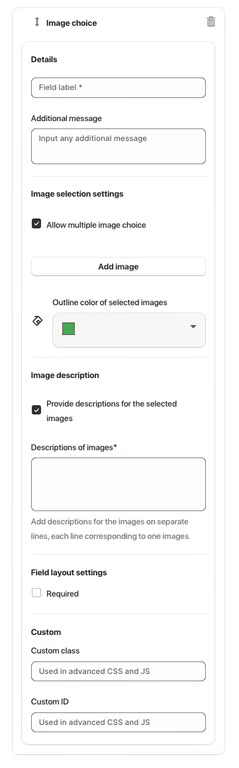
The Image Choice element allows users to select one or multiple images as their input. It is useful for surveys, product preferences, or visual feedback forms.
Available Options:
Field label – sets the visible name of the image choice field.
Additional message – optional helper text displayed below the field.
Image Selection Settings:
Allow multiple image choice – lets users select more than one image.
Outline color of selected images – define a border color for selected images.
Image description – provide descriptions for the selected images.
Descriptions of images* – add descriptions for each image on separate lines, each line corresponding to one image.
Field Layout Settings:
Required – makes image selection mandatory.
Custom class – used for advanced styling or JavaScript.
Custom ID – unique identifier for targeting the field with CSS or JS.
Was this article helpful?
That’s Great!
Thank you for your feedback
Sorry! We couldn't be helpful
Thank you for your feedback
Feedback sent
We appreciate your effort and will try to fix the article