The Signature Upload element allows users to upload their signature directly through the form. It is useful for collecting approvals, consents, or signed documents electronically.
Available Options:
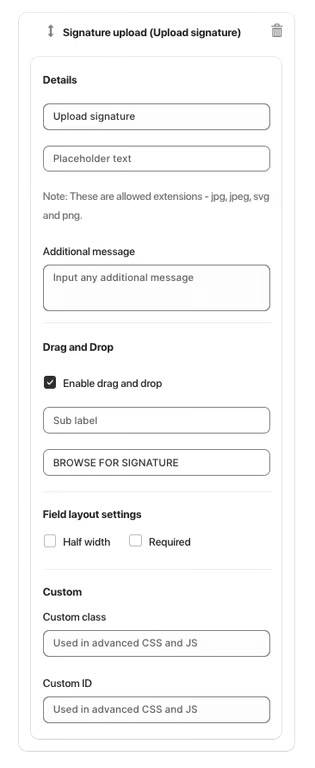
Upload signature – default label for the signature upload button.
Placeholder text – optional text displayed in the field before a file is uploaded.
Allowed file types – only images with extensions .jpg, .jpeg, .svg, or .png are accepted.
Additional message – optional helper text displayed below the field.
Sub-label – additional label displayed below the button (e.g., BROWSE FOR SIGNATURE).
Drag and Drop:
Enable drag and drop – allows users to drag signature images directly into the field instead of using the button.
Field Layout Settings:
Half width – displays the field in half of the form width.
Required – makes signature upload mandatory.
Advanced Settings:
Custom class – used for advanced styling or JavaScript.
Custom ID – unique identifier for targeting the field with CSS or JS.
Was this article helpful?
That’s Great!
Thank you for your feedback
Sorry! We couldn't be helpful
Thank you for your feedback
Feedback sent
We appreciate your effort and will try to fix the article