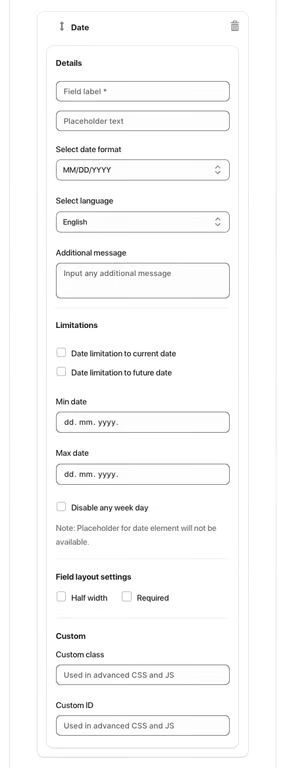
The Date element allows users to select a date from a calendar picker. It is useful for forms requiring appointments, birthdays, or other date-based inputs.
Available Options:
Field label – sets the visible name of the date field.
Placeholder text – displays sample text before the user selects a date.
Select date format – choose the format of the date (e.g., MM/DD/YYYY).
Select language – set the language for the calendar display.
Additional message – optional helper text displayed below the field.
Limitations:
Date limitation to current date – restricts selection to today or earlier.
Date limitation to future date – restricts selection to dates from today onward.
Min date / Max date – define specific date range.
Disable any week day – prevent selection of specific weekdays.
Note: Placeholder text may not be available when using date limitations.
Field Layout Settings:
Half width – displays the field in half of the form width.
Required – makes date selection mandatory.
Advanced Settings:
Custom class – used for advanced styling or JavaScript.
Custom ID – unique identifier for targeting the field with CSS or JS.
Was this article helpful?
That’s Great!
Thank you for your feedback
Sorry! We couldn't be helpful
Thank you for your feedback
Feedback sent
We appreciate your effort and will try to fix the article