You can add a form to appear as a pop-up on any button on the page you want. To do so, follow these steps:
Go to the edit section of the form you embedded to the storefront in the previous step.
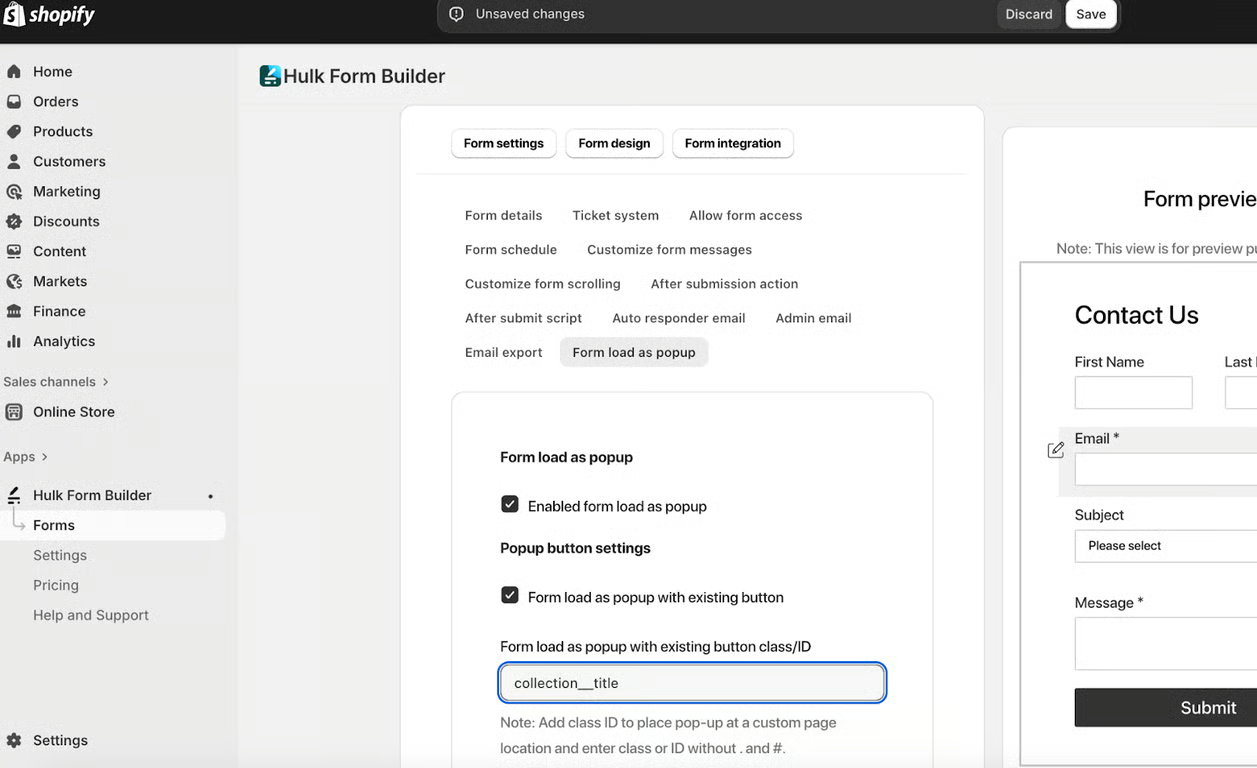
Go to Form Settings -> Form load as popup -> Check the Enabled form as a pop box -> Check the Form load as popup with existing button checkbox
Go to the storefront, hover over the button where you want the form to appear. Right-click and select Inspect. From the highlighted div class, copy only the text within the quotation marks up to the first space.
Paste it in the Form load as a pop-up with an existing button class/ID field
Watch the video for detailed instructions:
Was this article helpful?
That’s Great!
Thank you for your feedback
Sorry! We couldn't be helpful
Thank you for your feedback
Feedback sent
We appreciate your effort and will try to fix the article