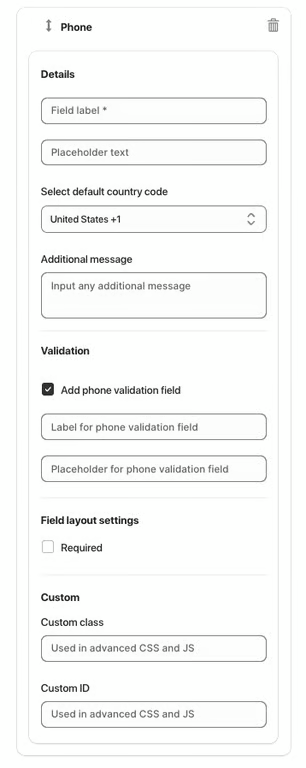
The Phone element allows users to enter their phone number. It is useful for contact forms, customer support requests, or verification purposes.
Available Options:
Field label – sets the visible name of the phone field.
Placeholder text – displays sample text before the user enters their phone number.
Select default country code – choose the default country code for the phone input (e.g., United States +1).
Additional message – optional helper text displayed below the field.
Validation:
Add phone validation field – ensures the entered number is valid according to the selected country code.
Label for phone validation field – sets the visible label for the validation input (optional).
Placeholder for phone validation field – sample text for the validation input (optional).
Field Layout Settings:
Required – makes phone input mandatory.
Custom class – used for advanced styling or JavaScript.
Custom ID – unique identifier for targeting the field with CSS or JS.
Was this article helpful?
That’s Great!
Thank you for your feedback
Sorry! We couldn't be helpful
Thank you for your feedback
Feedback sent
We appreciate your effort and will try to fix the article